Vesper  Updates

Commodity Copilot available from every dashboard

by Vesper Team
Improvement
AI

Commodity Copilot is now accessible from any dashboard through a side panel. Ask questions as you work with your data.

What's new:

  • Copilot side panel is available on every dashboard. Open it without leaving your current view.

  • See your prices, charts, and reports on the left. Ask Copilot about them on the right.

  • Spot something in the data you want to understand? Just ask.

Why this matters:

Before this update, using Copilot meant navigating to a separate page. Now you can look at a price move in your chart and ask what's driving it without losing your place. Data and interpretation, side by side.

How to access?

Open the Copilot side panel using the icon in the top-right of any dashboard, or contact your Customer Success Manager at [email protected].
Consolidated Import/Export, Supply & Demand, and Futures Widgets

by Vesper Team
Improvement

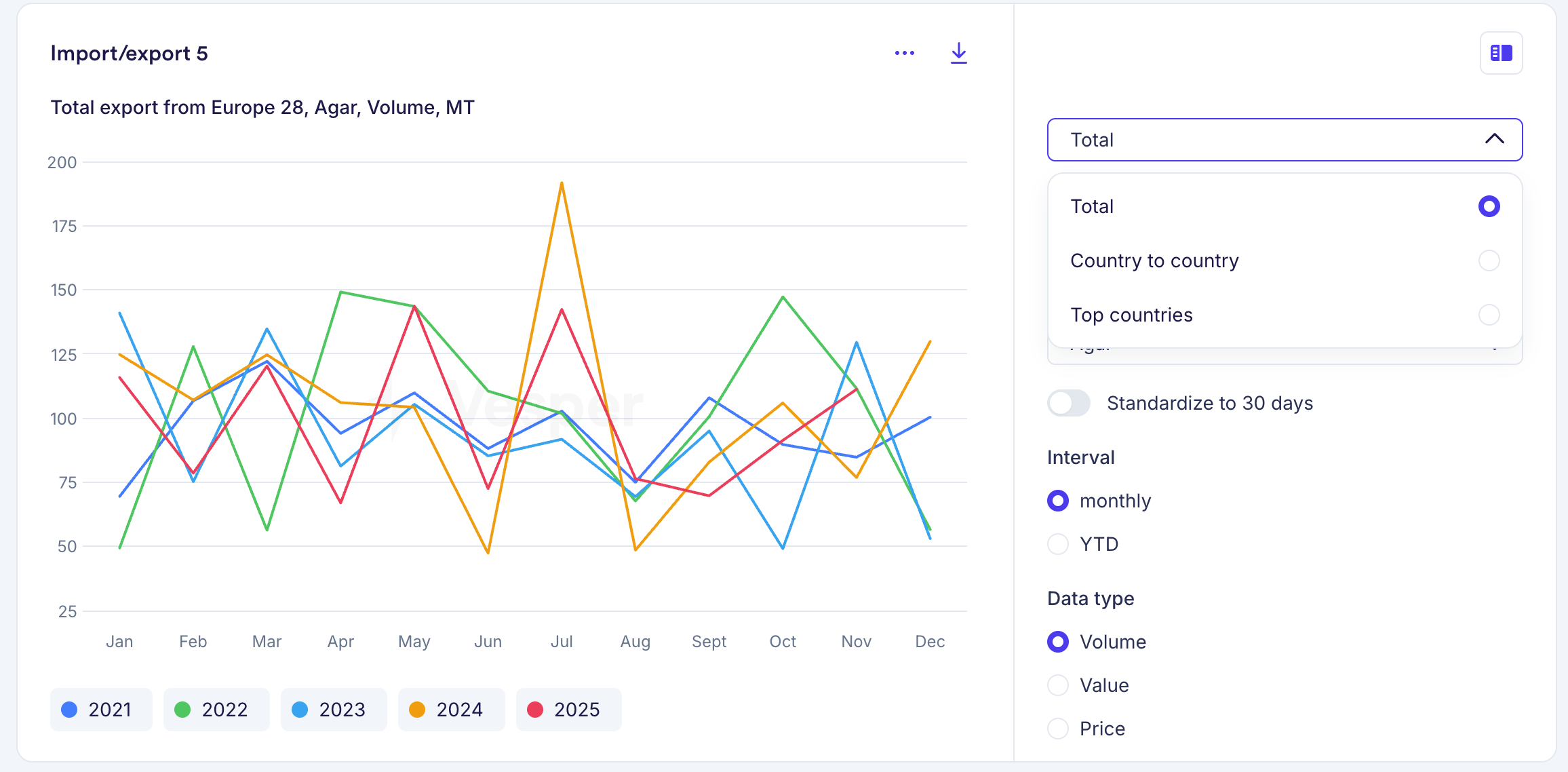
Import/Export, Supply & Demand, and Futures widgets each had multiple versions for different views of the same data. These are now consolidated into a single widget per data type. For example, where you previously had three separate Futures widgets, you now have one that covers all views.

What's new

  • Toggle between table and graph views within each widget

  • Switch between historical and forward data without leaving the widget

  • All controls are built into the widget, so one widget now does the job of several

Your existing widgets have been automatically replaced with the new versions, using the same parameters you had selected. Nothing changes to your dashboards. If you want different views side by side, you can duplicate a widget and set each one to a different view.

Why this matters

Where you previously needed multiple widgets to see the same data in different formats, one widget now covers it. Dashboards stay cleaner, and you spend less time setting up views.

On mobile, the consolidated widgets will follow at a later stage. For now, the previous versions remain available there.

Did you like this update?

LikeNeutralDislike

New US data partner: Sosland Publishing

by Vesper Team
New
Data
Partnerships
Oils & Fats
Grains & Feed
Sugar & Sweeteners
Cocoa

Vesper has partnered with Sosland Publishing to bring 114 weekly spot price series into the platform. Sosland is a leading US trade publisher covering food ingredient markets.

What's new:

  • 114 weekly spot price series from Sosland, now live
  • Coverage spans four commodity categories: Oils & Fats, Grains & Feed, Sugar, and Cocoa
  • All series are weekly frequency, reflecting US spot market conditions
  • A second batch covering forward cash prices and basis prices is planned for Q2 2026

Why this matters:

Sosland prices are widely referenced by buyers and sellers in North American ingredient trade. Having them in Vesper means you can compare US spot prices directly against European benchmarks in a single view. For categories like cocoa, oils, and grains where US and EU prices regularly diverge, that cross-regional visibility matters in negotiations.

How to Use It:

  • Prices Widget: search Sosland series by commodity or keyword
  • Price Comparison: set up US vs EU price comparisons for the same commodity
  • Cost Models: use Sosland weekly prices as inputs alongside existing European series

How to access?

Add to new or existing dashboards using the search function, or contact your Customer Success Manager at [email protected].

Bring Your Own Data (BYOD)

by Vesper Team, Product Marketing
New
Vesper Toolbox
Data
Cost Models

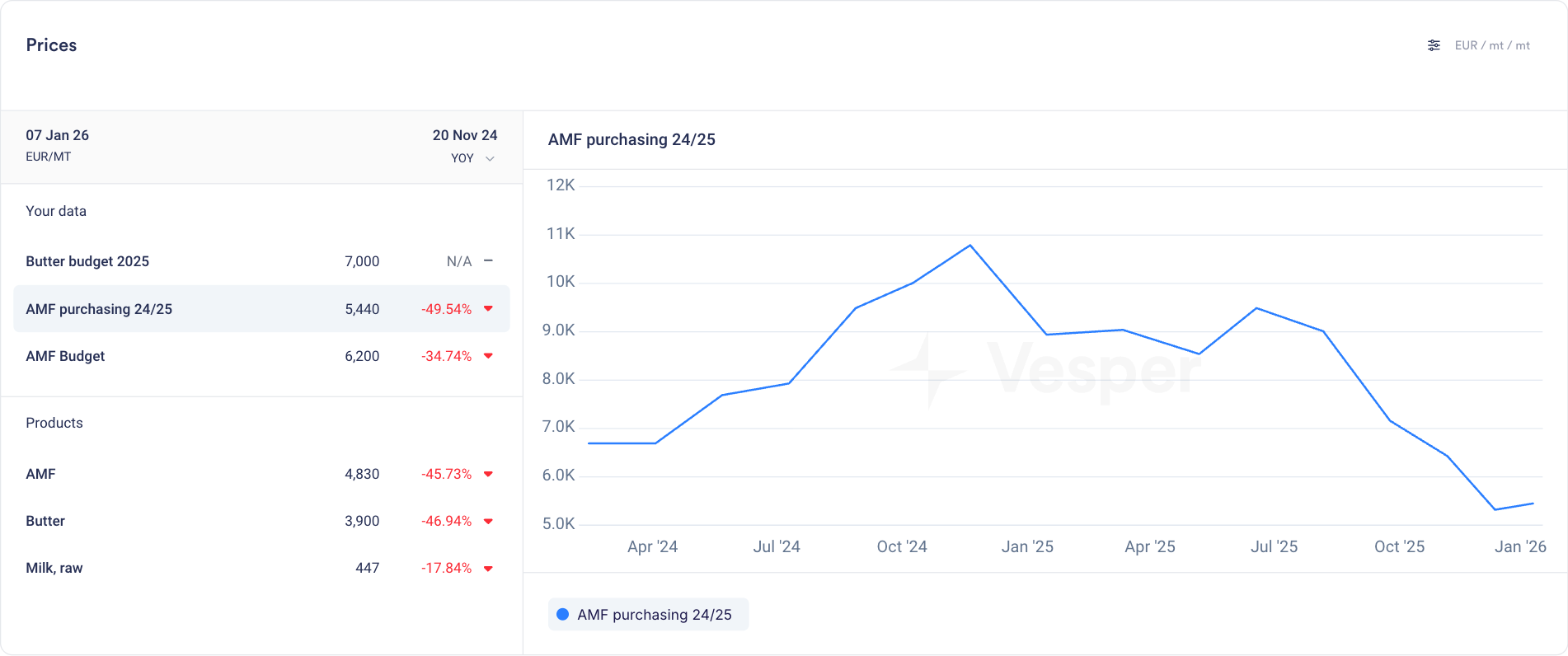
Upload your own budgets, purchase prices, and supplier quotes directly into Vesper. Your internal data now lives alongside global market intelligence, all in one place.

What's new

  • Add your own data via manual entry or CSV upload

  • Store budgets, contract prices, supplier quotes, or any internal pricing data

  • Unlimited series and products with no caps on what you can bring in

  • All your uploads organized in a new dedicated "Your Data" section

  • Access your data in the Prices widget, Price Comparison, and Cost Models

  • Use the full Vesper toolbox on your own data: visualize spreads, calculate averages, and add notes directly in graphs

  • Use your data as inputs for cost models and custom formulas

Why this matters

Vesper already lets you build custom benchmarks using formulas and cost models. Now you can go further. Bring in your actual purchase history, budget targets, and supplier offers to see the full picture.

  • Track performance: Compare what you paid against what the market did

  • Spot opportunities: See where your prices diverge from benchmarks over time

  • Centralize everything: Stop toggling between spreadsheets and Vesper. Make it your single source of truth.

Your data stays yours

Everything you upload is siloed, secure, and never shared with other users or used in any Vesper Price Index. Your competitive information remains private.

Did you like this update?

LikeNeutralDislike

Cost models in Price comparison

by Vesper Team, Product Marketing
New
Vesper Toolbox
Cost Models
Data
Vesper Price Index (VPI)

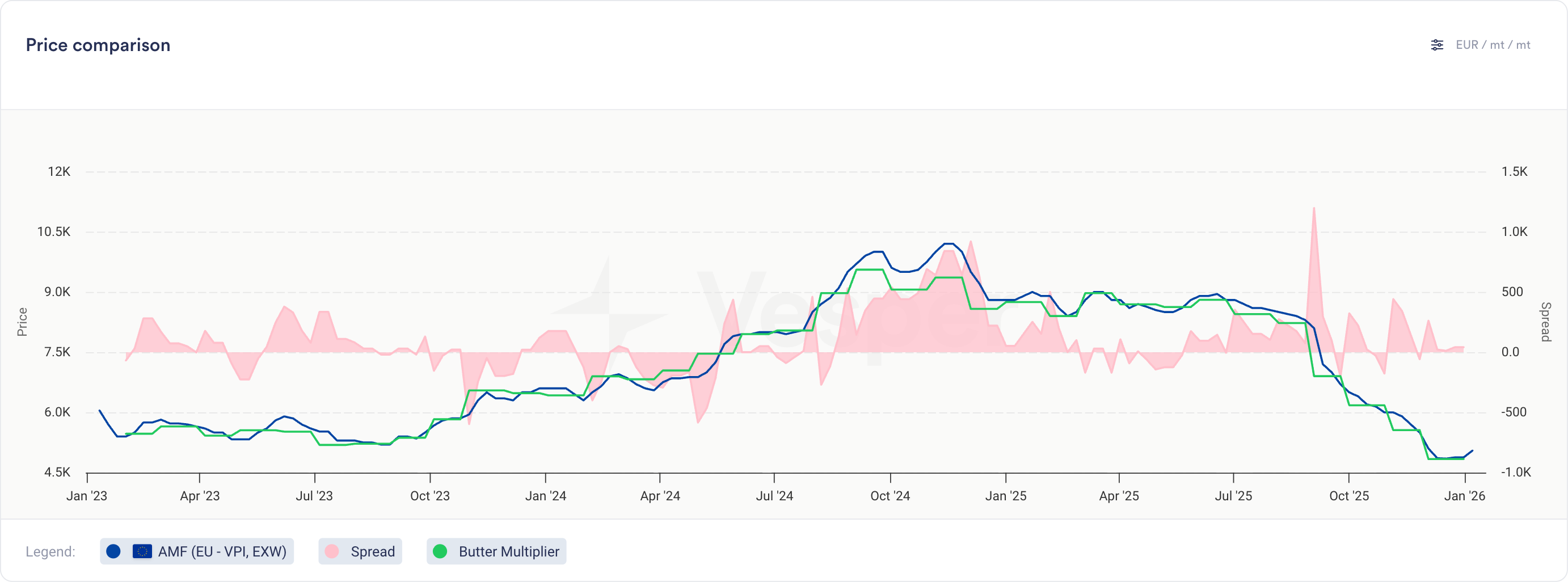
You can now compare your cost models directly against actual prices and other cost models in the Price Comparison widget.

What's new

  • Cost models now appear as selectable series in the Price Comparison widget

  • Select cost models from the product dropdown, labeled with their cost model name

  • View cost model historical data alongside multiple other cost models, price series, or any combination of both

  • Same visualization and interaction as product prices (line charts, tooltips, trends)

  • Note: Notes cannot be added to cost models

Why this matters

For finished goods, this bridges cost modeling and price analysis:

  • Compare different recipe options to find the most cost-effective formulation

  • Validate actual paid prices against theoretical cost models to spot inefficiencies

  • Track variance trends over time to identify negotiation opportunities

For commodity and ingredient buyers, this opens up new ways to analyze contract structures:

  • Build indices for weighted baskets and compare against other indices or your own prices

  • Model multiplier or fixed cost-plus structures on top of any benchmark

Did you like this update?

LikeNeutralDislike

New Vesper Price Index: Shea Butter & Derivatives

by Feiko Keilholz, Product Marketing
New
Cocoa
Oils & Fats
Chocolate, Confectionery & Ice Cream
Vesper Price Index (VPI)

Vesper has expanded its proprietary Shea & Cocoa equivalent fats coverage with 10 new Vesper Price Index (VPI) benchmarks for Shea butter and its derivatives. Published weekly, these benchmarks combine inputs from renowned brokers to bring transparency to one of the most opaque supply chains in the market.

What's New:

  • Expanded Shea Coverage: Weekly benchmarks for Crude, Semi-Refined, Handmade, Shea Olein, and Shea Oil across key West African origins (Ghana, Burkina Faso).

  • Broad Market Input: Prices derived from renowned brokers, combining inputs from multiple partners to ensure robust and unbiased market representation.

Why It Matters:

Public price transparency for Shea is extremely limited, leaving procurement teams to rely on fragmented signals or single-source quotes. These proprietary VPIs provide the independent reference needed to verify quotes in a notoriously non-transparent market. Especially with Cocoa price movements of the past years, this was a much-requested product from our users

How to Use It:

  • Prices Widget: Bookmark specific grades (e.g., Shea Stearin, Crude Shea Butter) for one-click access to the latest weekly prices.

  • Price Comparison: Compare different processing stages (e.g., Crude vs. Semi-Refined) to identify value opportunities and spot diverging trends between product types.

  • Cost Models: Select these Shea VPIs as ingredients in your Cost Models to forecast the total cost of confectionery, Chocolate or any other formulations using actual market data.

How to access?

Add to new or existing dashboards using the search function, or contact your Customer Success Manager at [email protected] to confirm which specific grades are currently active for your region.

Did you like this update?

LikeNeutralDislike

Weekly Forecasts

by Vesper Team, Product Marketing
New
Forecasting & Outlook
Improvement
AI
Data

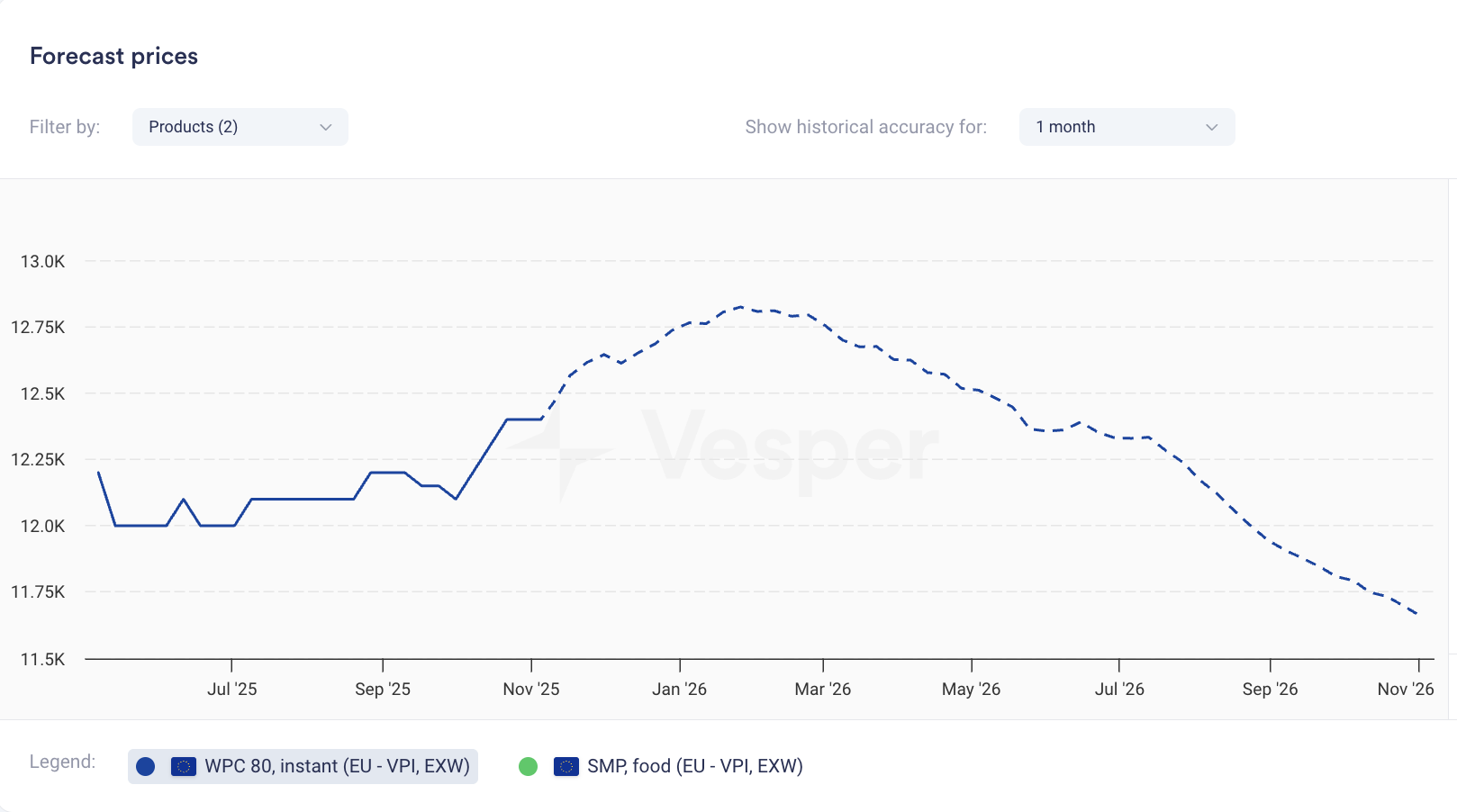
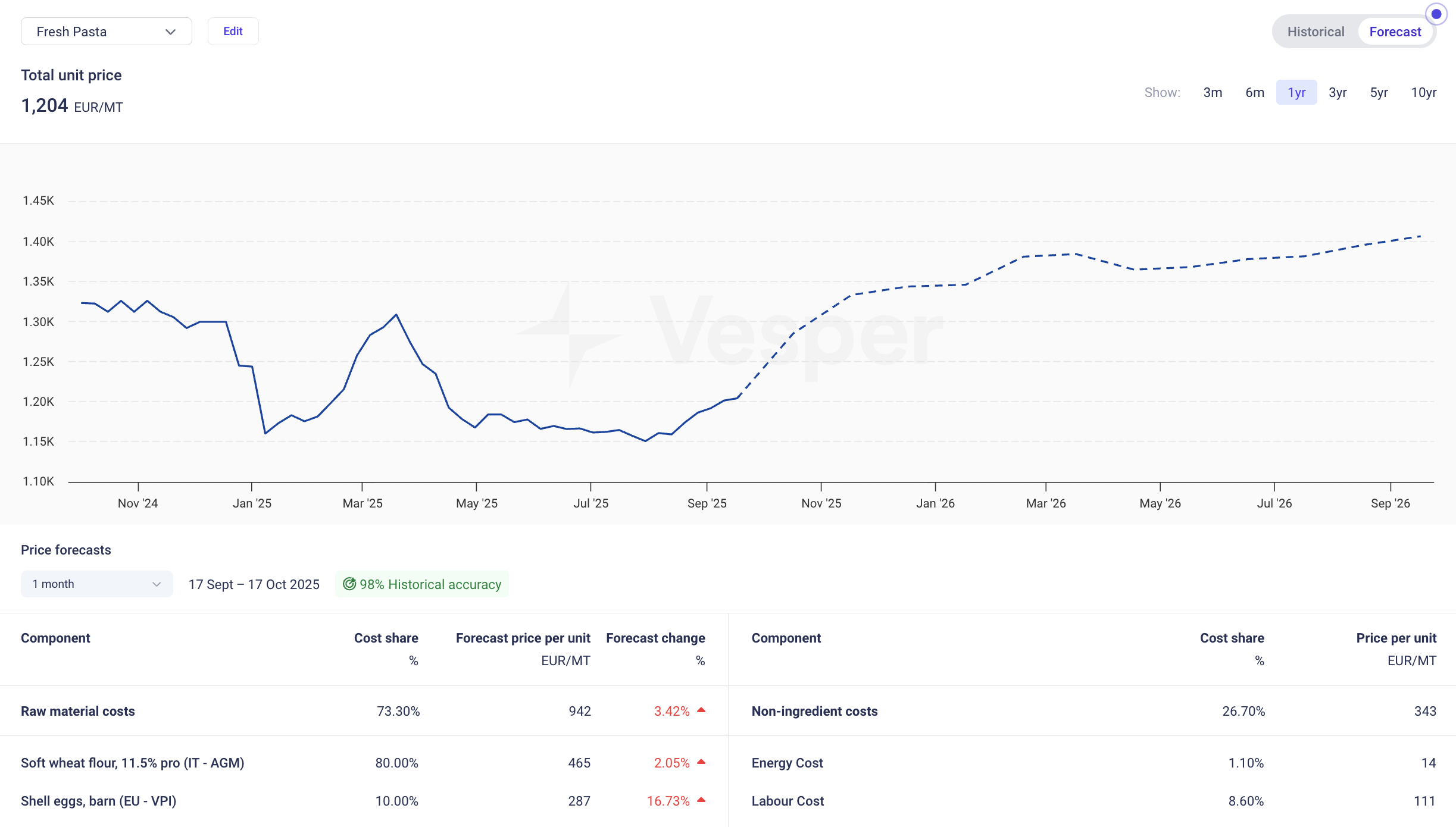
Price forecasts now display weekly data points instead of monthly. The same 12-month coverage now gives you 52 weekly forecasts; 6-month coverage gives you 26 weekly forecasts.

What it does: Shows forecast at weekly intervals rather than monthly What you can do: Track expected price movements week-to-week and time purchases more precisely Why it matters: Spot trends between monthly intervals and answer the tactical question: commit this week or wait? Especially valuable when markets are volatile.


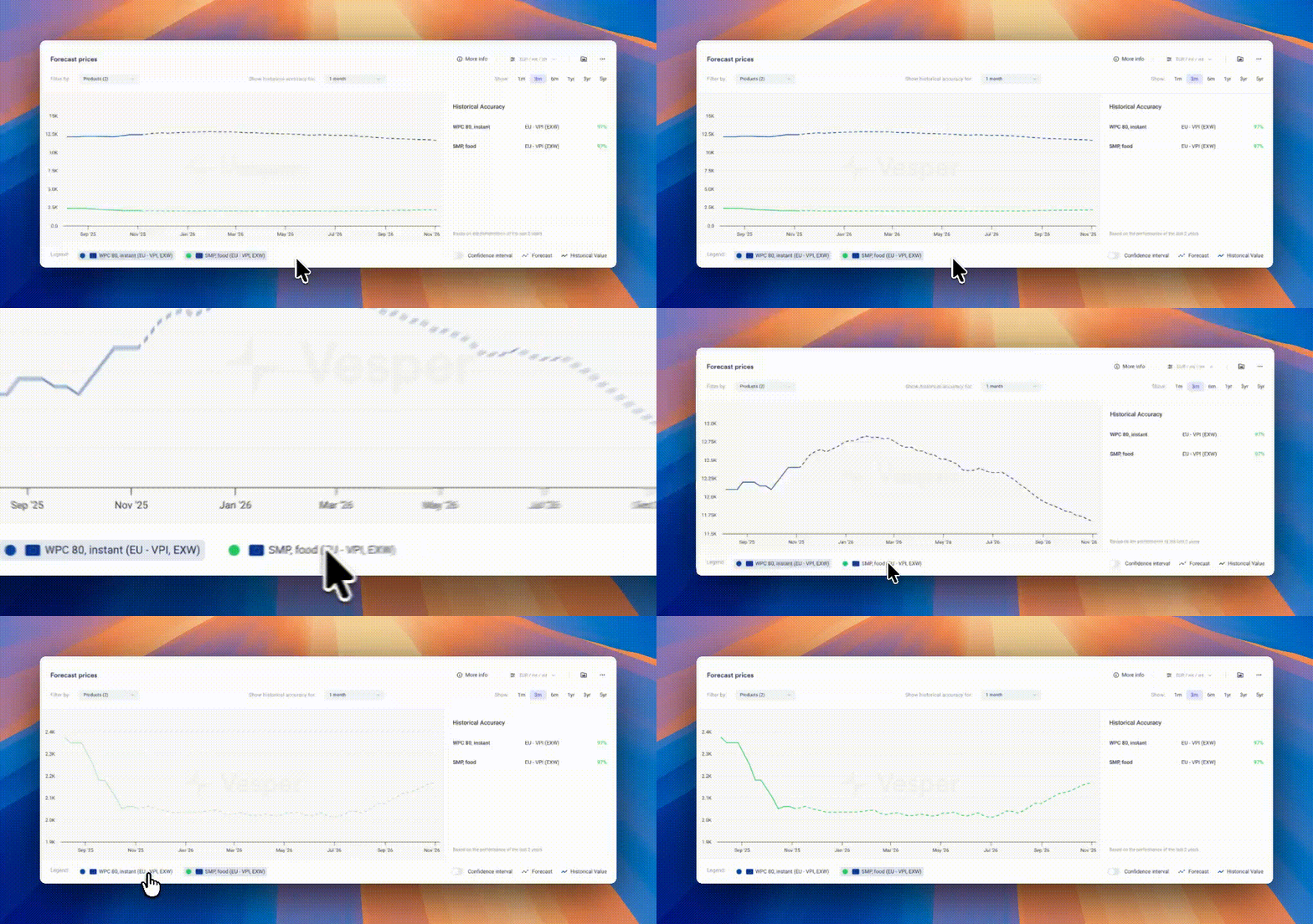
Pro Tip: If forecasts look flat due to scaling (multiple products or long price histories compress the view), zoom in on the graph, temporarily hide other products using the legend, or hover for exact forecasted values.

Did you like this update?

LikeNeutralDislike

Cost Model Forecast & Collaboration

by Vesper Team, Product Marketing
New
Cost Models
Forecasting & Outlook
AI

Vesper has launched Advanced Cost Model Collaboration & Forecasting, transforming how procurement teams build, share, and predict product costs. These features eliminate silos between team members and bring AI-powered forecasting directly into your cost models, enabling real-time collaboration on forward-looking procurement strategies.

What's New:

  • Cost Model Forecasting: View your total product costs up to 12 months ahead (depending on forecast availability). Toggle between historical and forecasted values with full accuracy calculations, detailed forecast tables showing price movements per ingredient, and weighted accuracy scores.

  • Cost Model Sharing: Share any cost model across your organization with granular access controls. Grant view-only permissions for stakeholder reviews or edit access for joint development, with all shared models appearing in a dedicated library.

  • Cost Model Collaboration: Work collaboratively on shared models with real-time updates visible to all collaborators. Receive notifications when colleagues share models or make edits, ensuring alignment on the latest cost structures.

Why It Matters: Cost models trapped in individual spreadsheets create bottlenecks and duplicate work. Meanwhile, static historical data leaves teams reactive rather than proactive. This update enables procurement teams to collaborate on living cost models that look forward, not only backward, turning isolated analysis into coordinated teamwork with visibility into future cost drivers.

How to Use It:

  1. Access forecasting by clicking the toggle in any cost model widget to switch between historical and forecast views

  2. Share models by selecting "Edit" in the cost model widget, then using the share option under "Access"

  3. Set permissions as either "Can view" for stakeholder visibility or "Can edit" for collaborative development

  4. Find shared models in the dedicated section of your cost model dropdown, marked with company models

  5. Monitor changes through the Notifications banner for updates on shared models

How to access? These features are live for all Vesper users. Contact your customer success manager at [email protected] for training on maximizing collaboration workflows.

Did you like this update?

LikeNeutralDislike

New: Deselect All Button

by Vesper Team, Product Marketing
Improvement
New
Vesper Toolbox

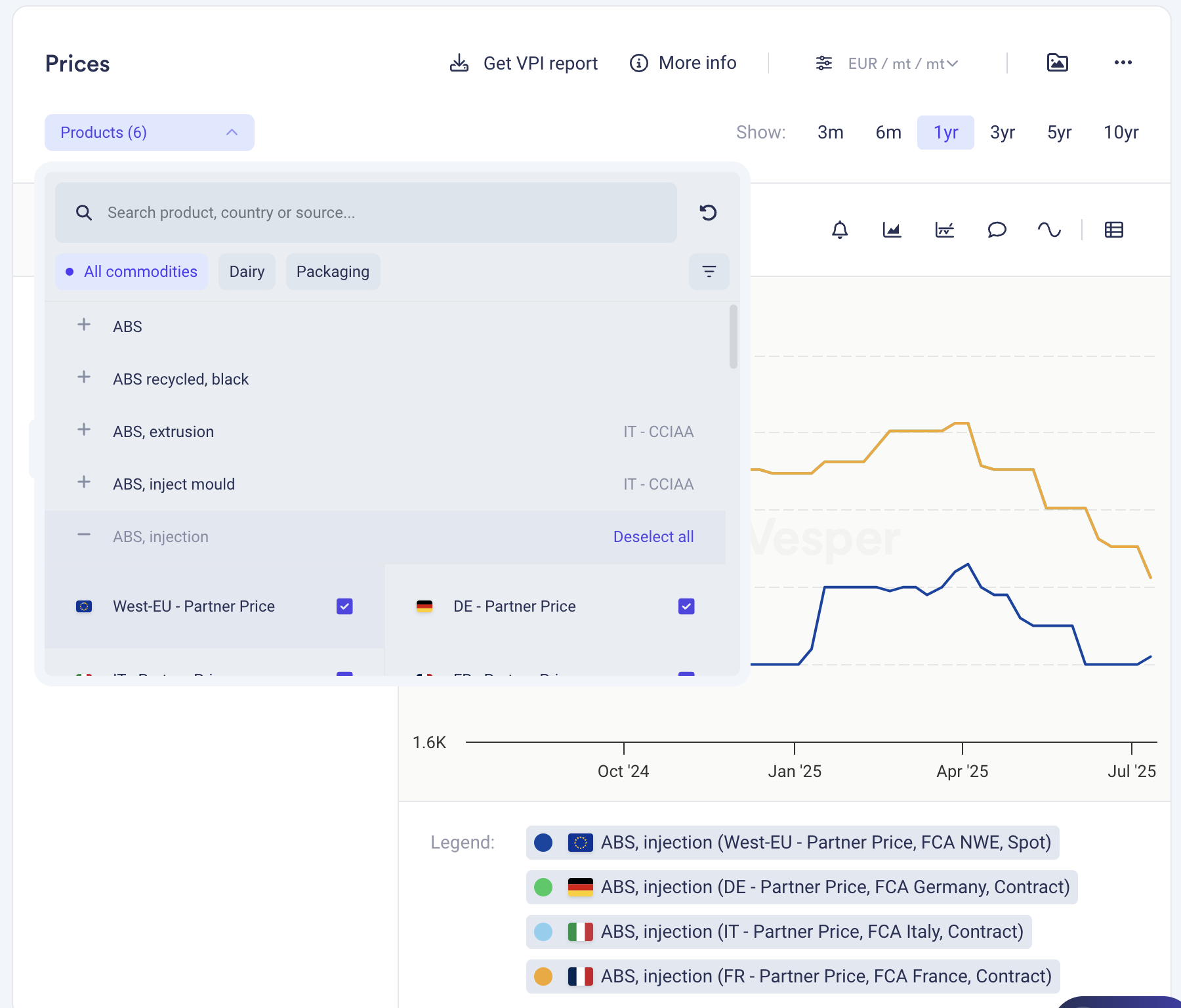
Clear your widget selections instantly with the new "Deselect all" button in dropdown menus. Start fresh analysis without manually removing each selection or dealing with cluttered views.

What it does: One click clears all active selections in a widget What you can do: Reset widgets to empty state for clean analysis Why it matters: Faster workflow, cleaner screens, less clicking

Find it in the dropdown menus across most widgets.

Did you like this update?

LikeNeutralDislike