Vesper  Updates

Cost Model Forecast & Collaboration

by Vesper Team, Product Marketing
New
Cost Models
Forecasting & Outlook
AI

Vesper has launched Advanced Cost Model Collaboration & Forecasting, transforming how procurement teams build, share, and predict product costs. These features eliminate silos between team members and bring AI-powered forecasting directly into your cost models, enabling real-time collaboration on forward-looking procurement strategies.

What's New:

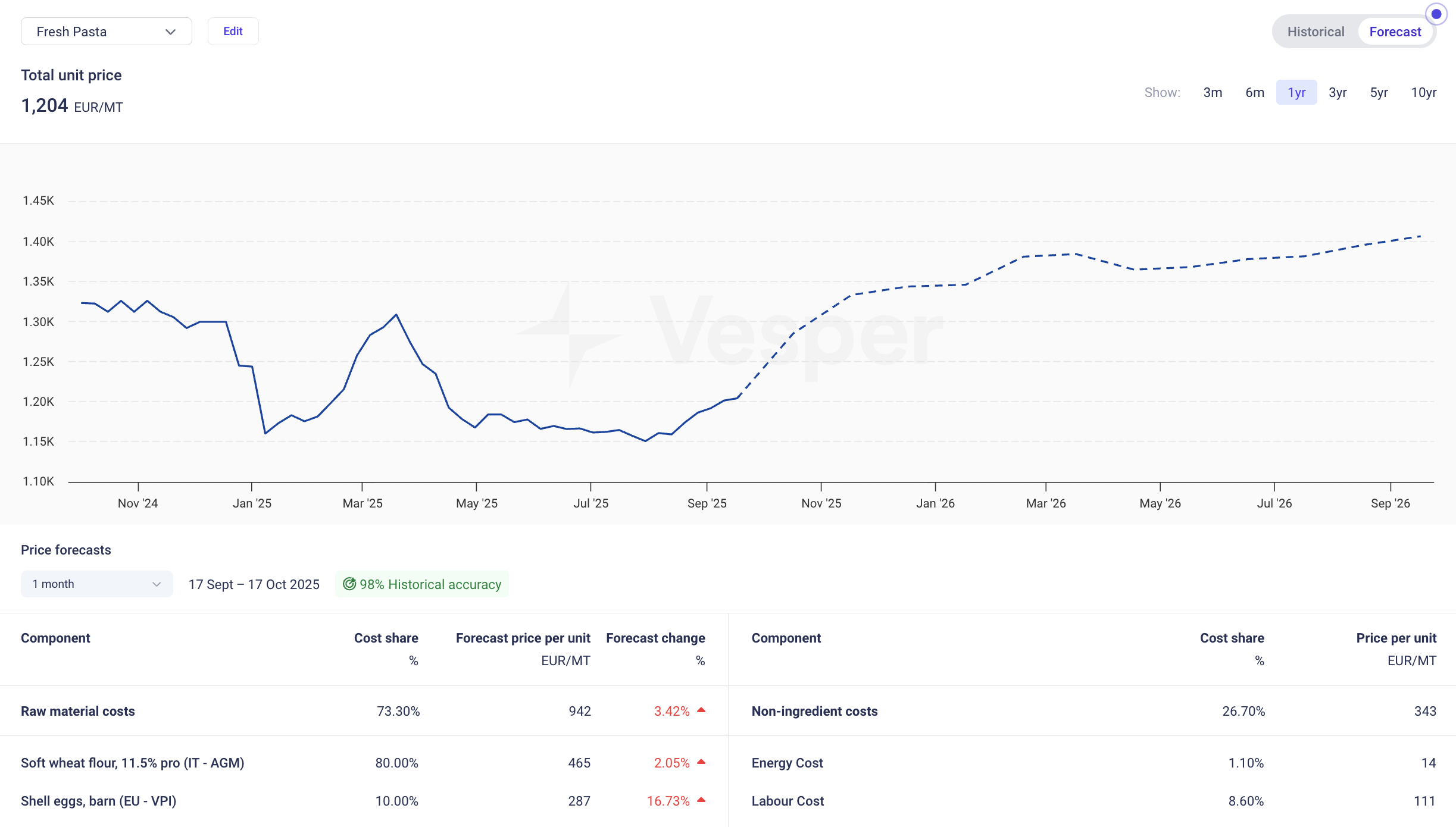
  • Cost Model Forecasting: View your total product costs up to 12 months ahead (depending on forecast availability). Toggle between historical and forecasted values with full accuracy calculations, detailed forecast tables showing price movements per ingredient, and weighted accuracy scores.

  • Cost Model Sharing: Share any cost model across your organization with granular access controls. Grant view-only permissions for stakeholder reviews or edit access for joint development, with all shared models appearing in a dedicated library.

  • Cost Model Collaboration: Work collaboratively on shared models with real-time updates visible to all collaborators. Receive notifications when colleagues share models or make edits, ensuring alignment on the latest cost structures.

Why It Matters: Cost models trapped in individual spreadsheets create bottlenecks and duplicate work. Meanwhile, static historical data leaves teams reactive rather than proactive. This update enables procurement teams to collaborate on living cost models that look forward, not only backward, turning isolated analysis into coordinated teamwork with visibility into future cost drivers.

How to Use It:

  1. Access forecasting by clicking the toggle in any cost model widget to switch between historical and forecast views

  2. Share models by selecting "Edit" in the cost model widget, then using the share option under "Access"

  3. Set permissions as either "Can view" for stakeholder visibility or "Can edit" for collaborative development

  4. Find shared models in the dedicated section of your cost model dropdown, marked with company models

  5. Monitor changes through the Notifications banner for updates on shared models

How to access? These features are live for all Vesper users. Contact your customer success manager at [email protected] for training on maximizing collaboration workflows.

Did you like this update?

LikeNeutralDislike

Cost Models: Turn commodity benchmarks into product pricing

by Vesper Team
New
Food Manufacturing
Retail
Cost Models

Summary: Vesper has launched Cost Models, a powerful new feature that transforms individual commodity benchmarks into complete product cost insights. This capability allows food manufacturers to combine weighted commodity benchmarks with standardized non-ingredient costs to build accurate product pricing models, delivering unprecedented visibility into true product economics.

What's New:

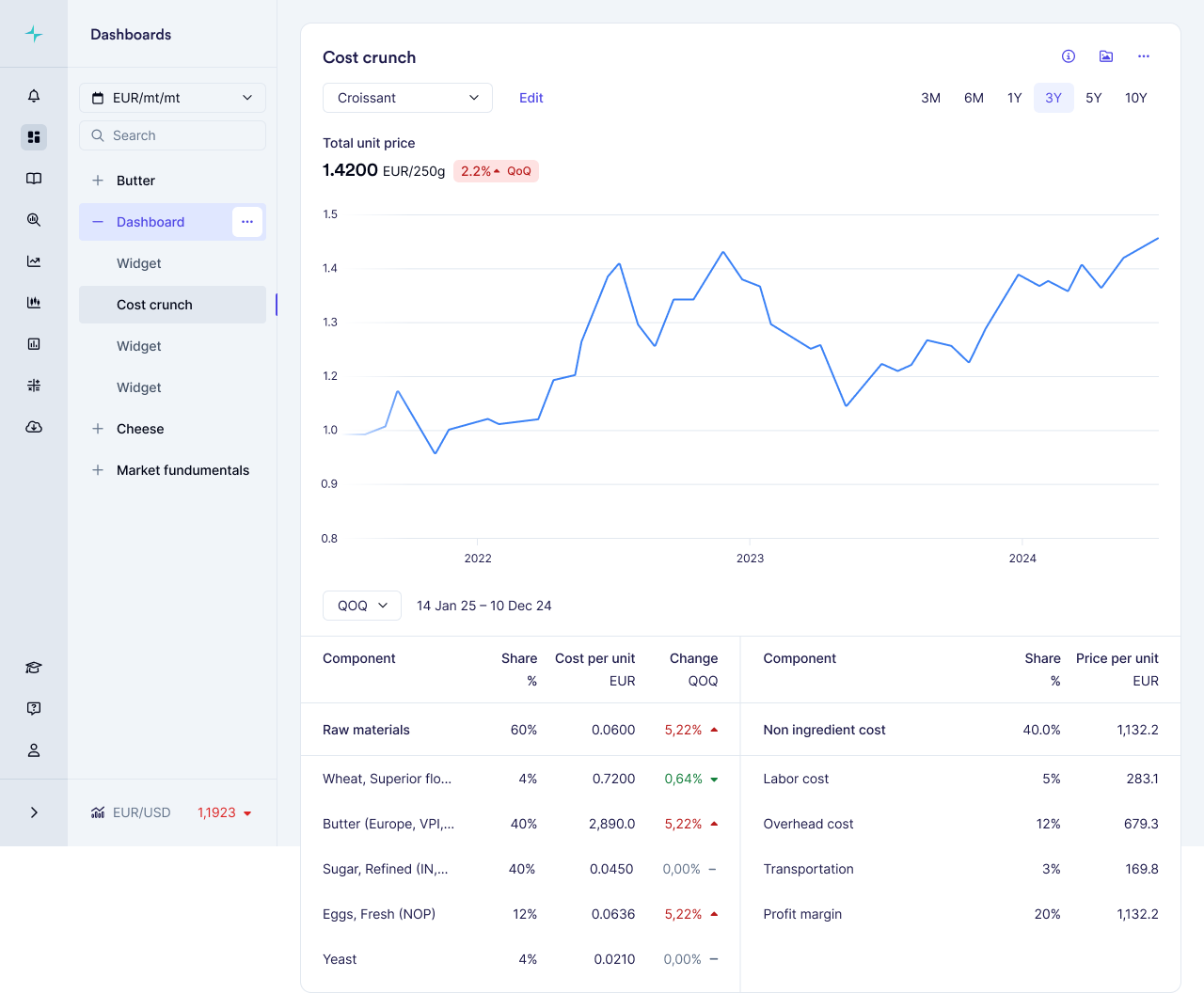
  • Build complete product cost models by combining multiple commodity benchmarks with precise weightings

  • Access industry-standard non-ingredient costs (labor, manufacturing, overhead) specific to your region

  • Choose from our template library for common food products or create custom models

  • Track how each component contributes to your total product cost with automatic updates whenever source prices change

Why It Matters: With record-high volatility across food commodities, understanding how ingredient changes impact finished products is critical for maintaining margins. Cost Models provide complete cost structure visibility for your entire organization: procurement teams can verify supplier price increases, finance can track margin impacts across product portfolios, and sales teams can justify price adjustments to customers with independently verified data. Non-ingredient costs can represent up to 47% of total product costs—a critical component that's now visible alongside your commodity benchmarks.

How to Use It:

  1. Access Cost Models through the main dashboard menu

  2. Choose between starting with a template or building a model from scratch

  3. Select ingredients from your available commodities and assign precise weightings

  4. Add country-specific non-ingredient costs by selecting your industry and location

  5. Save your model to track cost evolution over time as prices update automatically

Related Features: Cost Models integrates seamlessly with Vesper's existing capabilities:

  • Individual commodity price benchmarks (VPI, Partner prices, and Public benchmarks found in prices widgets)

  • Incorporate into your own custom dashboards

  • Coming in Q3 2025: Forecasting capabilities for your cost models

Did you like this update?

LikeNeutralDislike