Vesper  Updates

Commodity Copilot available from every dashboard

by Vesper Team
Improvement
AI

Commodity Copilot is now accessible from any dashboard through a side panel. Ask questions as you work with your data.

What's new:

  • Copilot side panel is available on every dashboard. Open it without leaving your current view.

  • See your prices, charts, and reports on the left. Ask Copilot about them on the right.

  • Spot something in the data you want to understand? Just ask.

Why this matters:

Before this update, using Copilot meant navigating to a separate page. Now you can look at a price move in your chart and ask what's driving it without losing your place. Data and interpretation, side by side.

How to access?

Open the Copilot side panel using the icon in the top-right of any dashboard, or contact your Customer Success Manager at [email protected].
Consolidated Import/Export, Supply & Demand, and Futures Widgets

by Vesper Team
Improvement

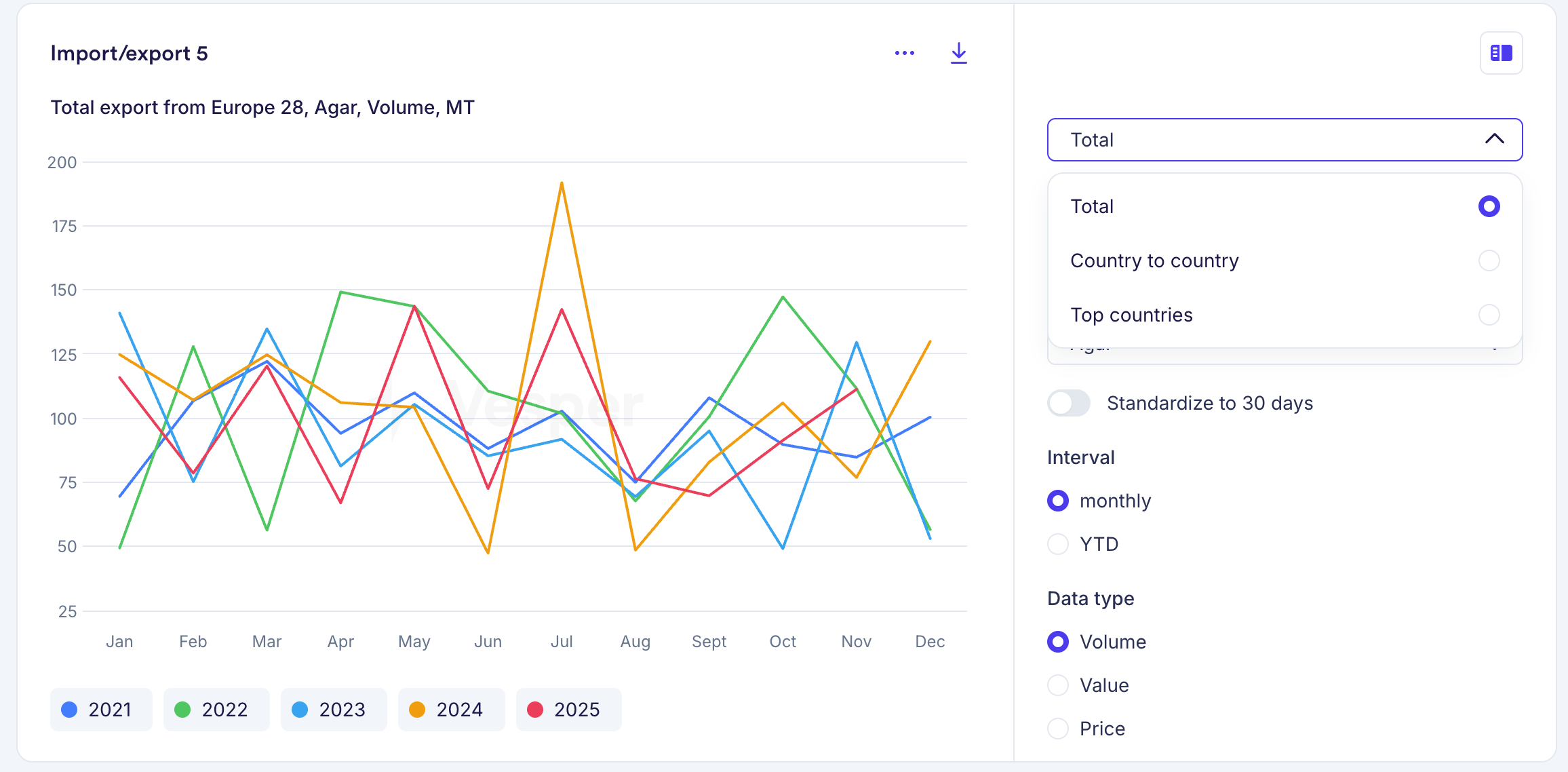
Import/Export, Supply & Demand, and Futures widgets each had multiple versions for different views of the same data. These are now consolidated into a single widget per data type. For example, where you previously had three separate Futures widgets, you now have one that covers all views.

What's new

  • Toggle between table and graph views within each widget

  • Switch between historical and forward data without leaving the widget

  • All controls are built into the widget, so one widget now does the job of several

Your existing widgets have been automatically replaced with the new versions, using the same parameters you had selected. Nothing changes to your dashboards. If you want different views side by side, you can duplicate a widget and set each one to a different view.

Why this matters

Where you previously needed multiple widgets to see the same data in different formats, one widget now covers it. Dashboards stay cleaner, and you spend less time setting up views.

On mobile, the consolidated widgets will follow at a later stage. For now, the previous versions remain available there.

Did you like this update?

LikeNeutralDislike

Major US Price Expansion: 286 New USDA Series

by Vesper Team
New
Data
Vegetables & Pulses
Fruit
Meat & Poultry
Food Ingredients
Grains & Feed
Oils & Fats
Herbs & Spices
Chemicals
Sugar & Sweeteners

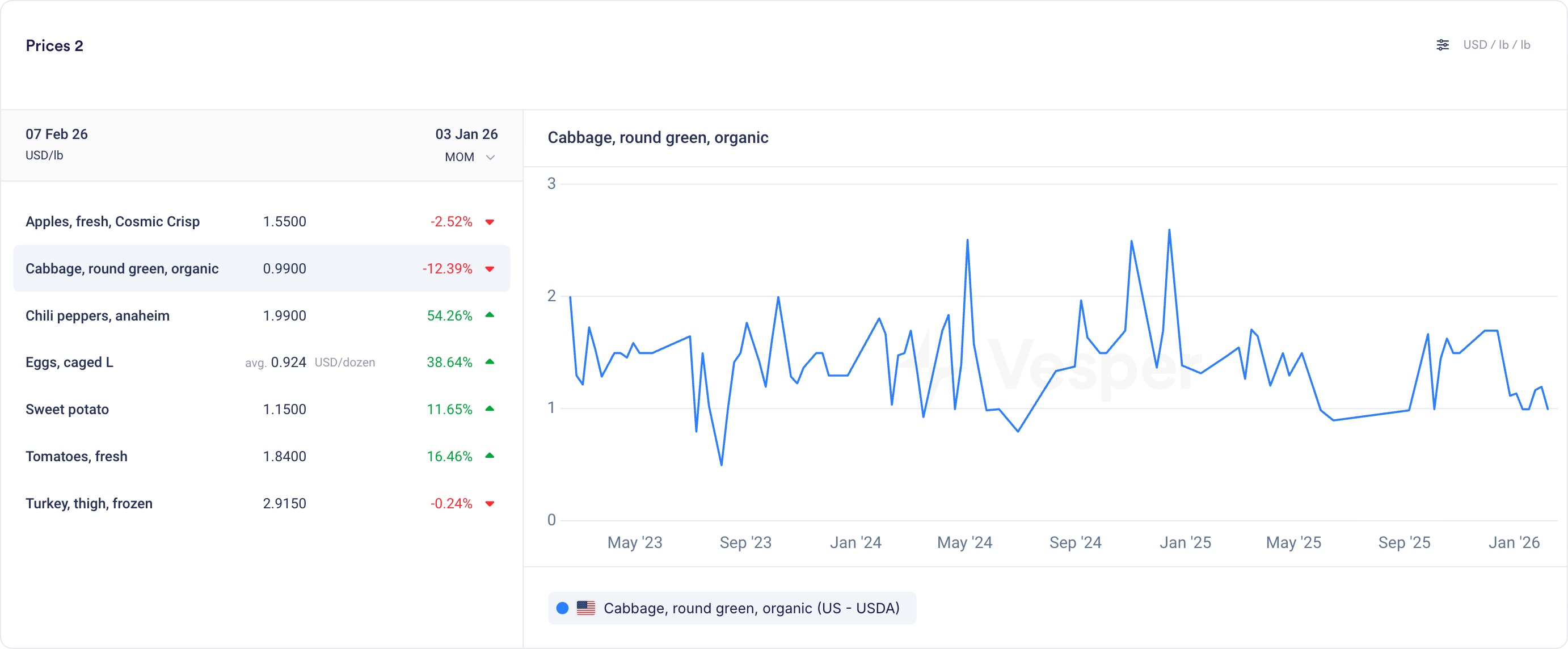
Vesper now includes 286 new price series from 13 USDA MARS reports, one of the most widely referenced public pricing sources in US agricultural markets. This is our largest single USDA expansion to date.

What's New:

  • Vegetables & Pulses: 107 new price series including potatoes, tomatoes, bell peppers, onions, carrots, broccoli, squash, black beans, pinto beans, lentils, chickpeas, and yellow peas

  • Fruits: 80 new price series covering apples (Gala, Honeycrisp, Fuji, Cosmic Crisp and more), oranges, grapes, strawberries, peaches, pears, bananas, kiwi, and watermelon, including organic variants

  • Meat & Poultry: 39 new price series for beef primal cuts (ribeye, tenderloin, strip loin, chuck, round), lamb (rack, leg, shoulder), turkey (whole, breast, drumsticks, wings), hog, and cattle live/dressed weight prices

  • Food Ingredients: 29 new price series for eggs (caged and free-range across multiple sizes and regions) and ethanol

  • Grains & Feed: 14 new price series for alfalfa, corn (food and feed grade), soybean, DDGS, corn gluten, cottonseed, canola meal, and blood meal

  • Oils & Fats: 8 new price series including choice white grease and animal fat derivatives

  • Herbs & Spices: 5 new price series for jalapeño, serrano, poblano, anaheim chili peppers, and garlic

  • Chemicals: 3 new price series

  • Sugar: 1 new price series

See the complete product list for all 286 series.

Why It Matters:

USDA MARS reports are among the most commonly referenced pricing benchmarks in US agricultural markets. These 286 series bring that coverage directly into Vesper, so you can track US prices for fresh produce, proteins, grains, feed ingredients, and eggs alongside your existing European and global series, all in one place.

How to Use It:

  • Prices Widget: Search for specific products (e.g., "beef ribeye" or "apples Honeycrisp") to bookmark USDA MARS prices alongside your existing series

  • Price Comparison: Compare USDA US prices with European or global equivalents for with different prodcut names

  • Cost Models: Add USDA ingredient prices to your cost models for a more complete picture of US-sourced product costs

How to access?

Add to new or existing dashboards using the search function, or contact your Customer Success Manager at [email protected] for any questions.

205 new Mexico price series from SNIIM

by Vesper Team
New
Data
Fruit
Vegetables & Pulses
Herbs & Spices
Grains & Feed
Nuts, Seeds & Dried Fruits

Vesper has added 205 price series from SNIIM, Mexico's national food price information system. This update includes 168 products that are new to the platform.

What's new:

  • 205 new price series from SNIIM (Sistema Nacional de Información e Integración de Mercados)
  • 168 newly created products
  • Coverage by category:
    • Fruits: 86 series
    • Vegetables & Pulses: 76 series
    • Herbs & Spices: 24 series
    • Grains & Feed: 9 series
    • Nuts, Seeds & Dried Fruit: 6 series
    • Beverages: 2 series
    • Sugar: 2 series

Why this matters:

Mexico is a major origin market for fresh produce, herbs, and specialty ingredients sourced by North American and European food manufacturers. SNIIM data gives buyers an official government reference for regional spot prices. Useful for verifying quotes, tracking seasonal price patterns, and benchmarking cross-border sourcing for categories like avocados, chilies, tomatoes, and tropical fruit.

How to Use It:

  • Prices Widget: search by product name or filter by Mexico as origin market
  • Price Comparison: compare SNIIM prices against other regional sources for the same commodity
  • Cost Models: add Mexican produce prices as inputs to ingredient cost models

How to access?

Add to new or existing dashboards using the search function, or contact your Customer Success Manager at [email protected].

New Vesper Price Index: WPC80 Regular (US & EU)

by Vesper Team, Product Marketing
New
Vesper Price Index (VPI)
Specialized Nutrition
Sports Nutrition
Dairy

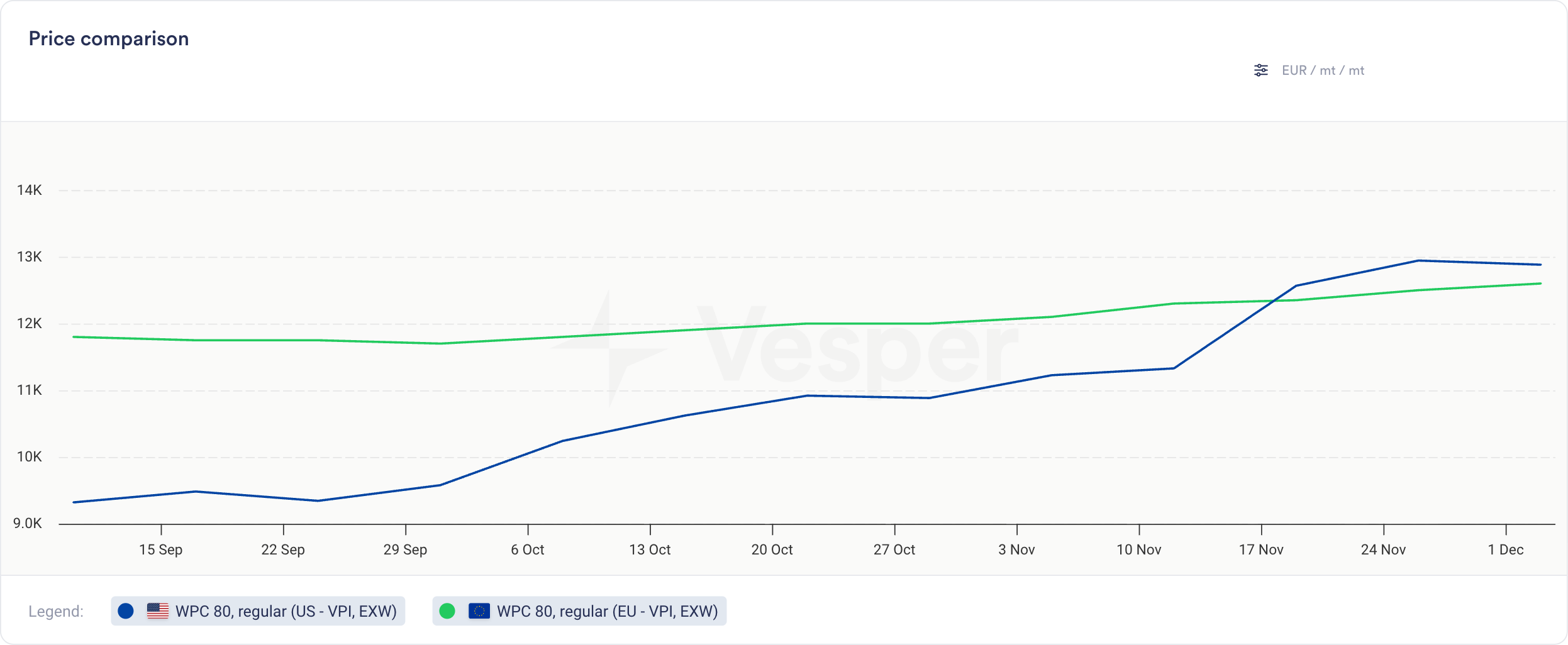
Vesper has expanded its proprietary specialty dairy protein coverage with two new Vesper Price Index (VPI) benchmarks: WPC80 Regular US and WPC80 Regular EU. Published every Wednesday, these benchmarks provide independent, region-specific price visibility, allowing procurement teams to track actual market spreads rather than relying on fixed premium assumptions or generic proxies.

What's New:

  • Weekly Regional Benchmarks: Prices for WPC80 Regular in the US and EU, published every Wednesday.

  • Verified Market Input: Prices derived from verified active market participants—both buyers and sellers—so you see where trade is actually getting done.

  • Deep Specialty Coverage: Strengthens Vesper’s unique position in specialty proteins, joining our existing benchmarks for WPC80 Instant, MPCs, WPI, Caseinates, and other niche protein products.

Why It Matters:

Relying on "80 Instant" for "Regular" WPC80 can hide the actual cost. These new Vesper benchmarks provide the independent reference needed to verify quotes against actual market prices. By establishing a shared view of the market, buyers and sellers can align on price faster, ensuring fair trade and reducing the time spent negotiating over data sources.

How to Use It:

  • Prices Widget: Bookmark the US and EU prices for one-click access to the latest Wednesday publication.

  • Price Comparison: Compare the new WPC80 Regular prices to the Instant variant and use the Spread function to instantly visualize correlations, spot patterns, and track how the price gap evolves over time.

  • Cost Models: Select these new benchmarks as ingredients in your Cost Models to see product costs with WPC80 Regular as an ingredient.

How to access?

These benchmarks are live for all Vesper users with access to the Dairy module. Contact your customer success manager at [email protected] for help integrating these new indices into your dashboard.

Did you like this update?

LikeNeutralDislike

Weekly Forecasts

by Vesper Team, Product Marketing
New
Forecasting & Outlook
Improvement
AI
Data

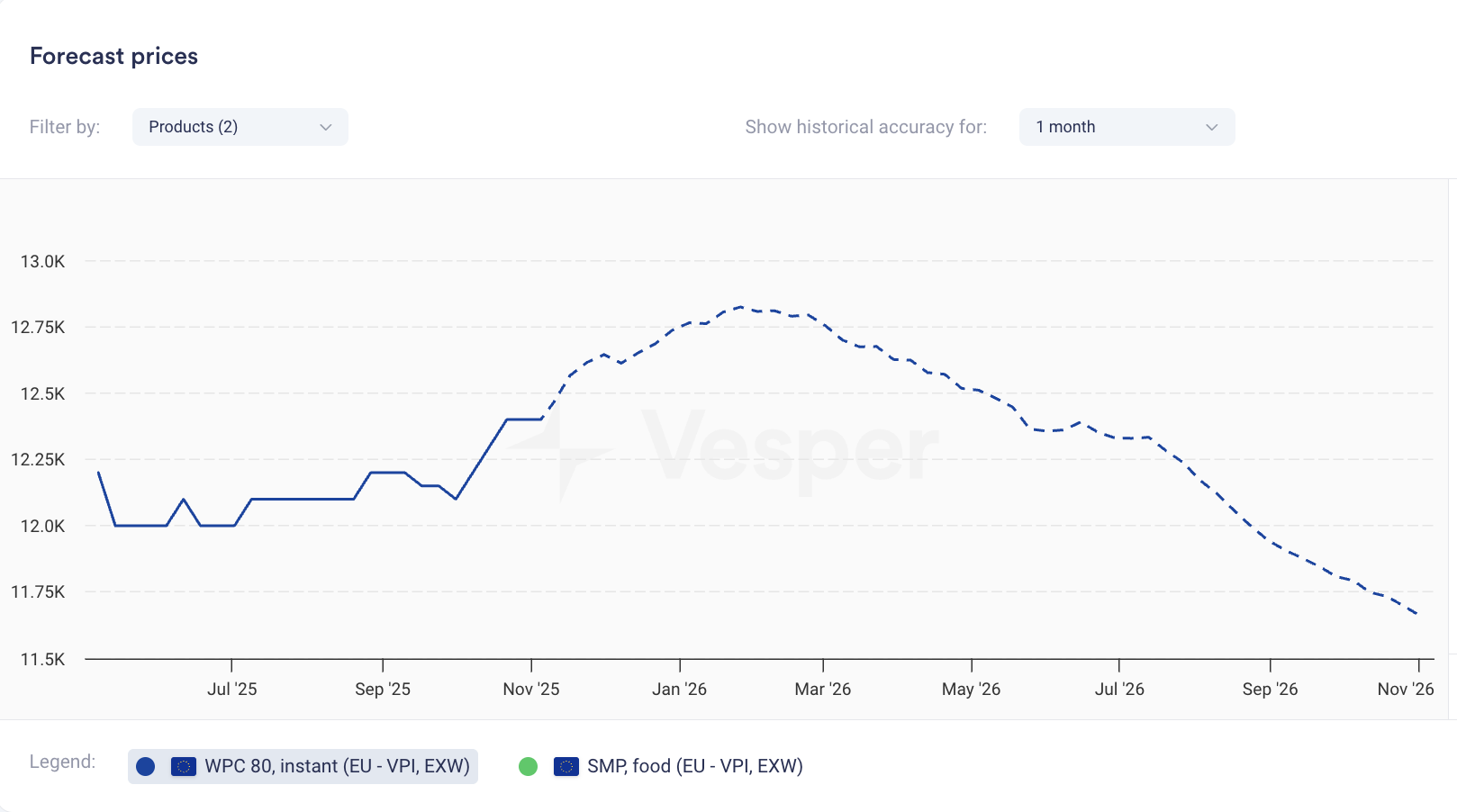
Price forecasts now display weekly data points instead of monthly. The same 12-month coverage now gives you 52 weekly forecasts; 6-month coverage gives you 26 weekly forecasts.

What it does: Shows forecast at weekly intervals rather than monthly What you can do: Track expected price movements week-to-week and time purchases more precisely Why it matters: Spot trends between monthly intervals and answer the tactical question: commit this week or wait? Especially valuable when markets are volatile.


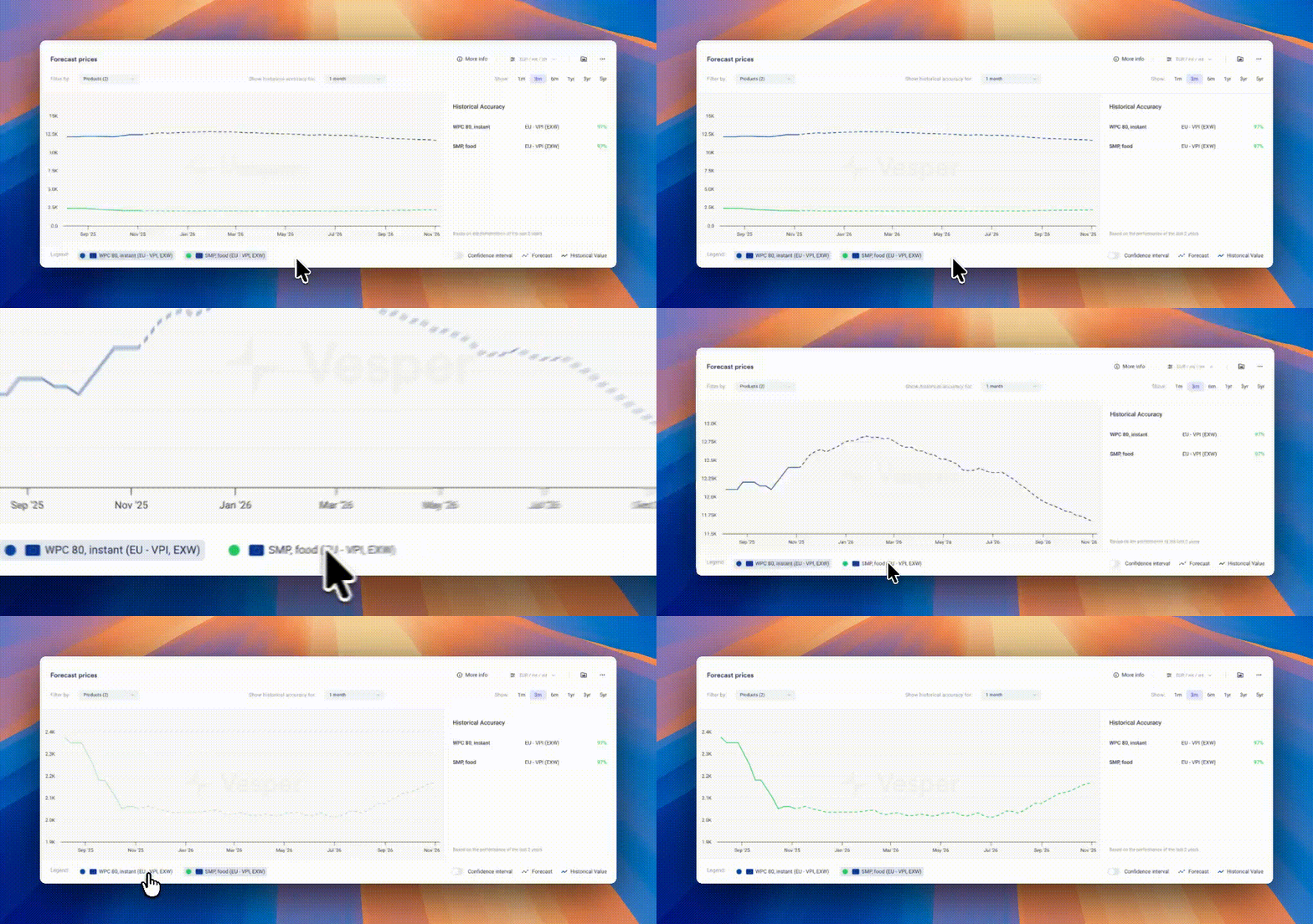
Pro Tip: If forecasts look flat due to scaling (multiple products or long price histories compress the view), zoom in on the graph, temporarily hide other products using the legend, or hover for exact forecasted values.

Did you like this update?

LikeNeutralDislike

New: Deselect All Button

by Vesper Team, Product Marketing
Improvement
New
Vesper Toolbox

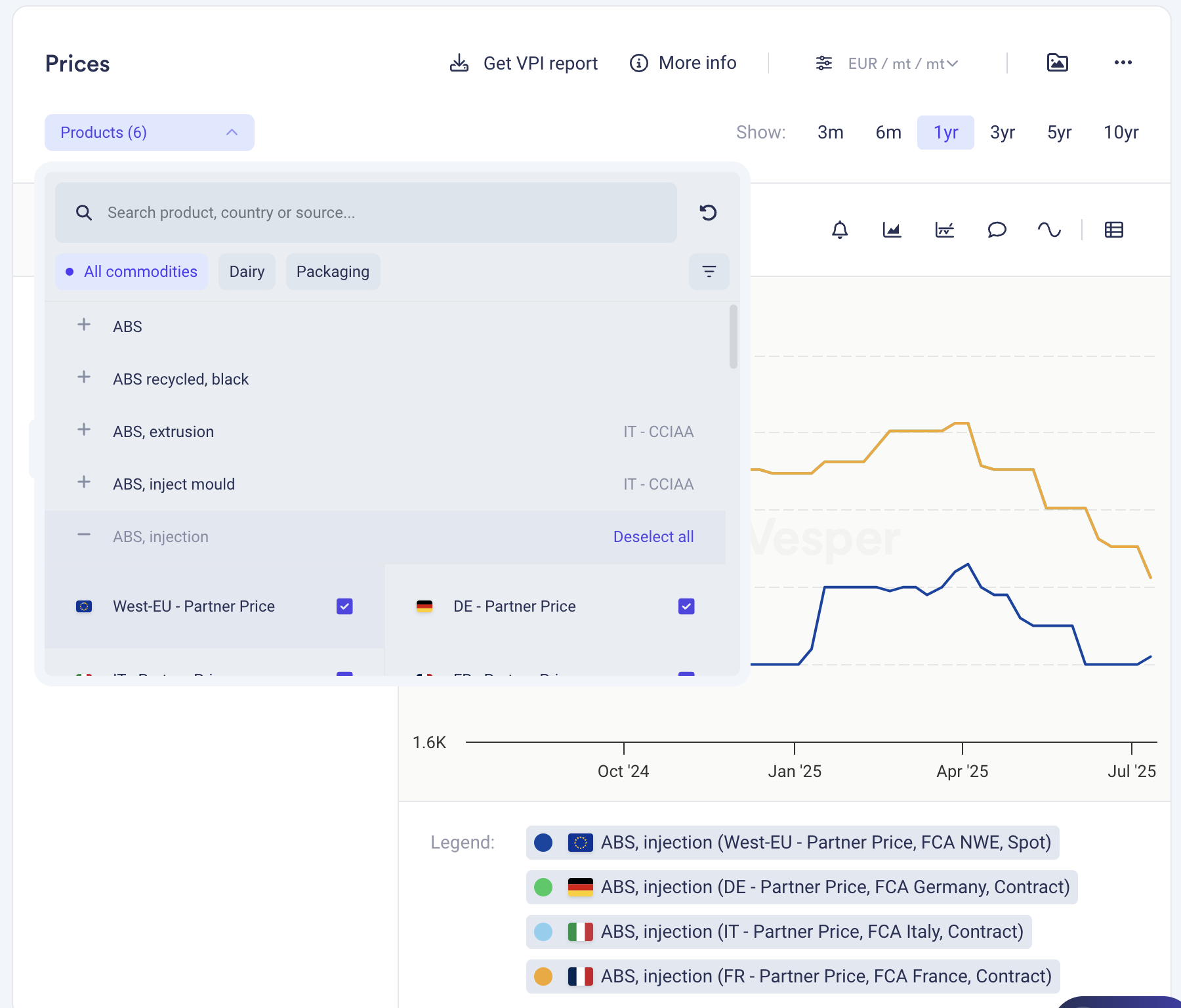
Clear your widget selections instantly with the new "Deselect all" button in dropdown menus. Start fresh analysis without manually removing each selection or dealing with cluttered views.

What it does: One click clears all active selections in a widget What you can do: Reset widgets to empty state for clean analysis Why it matters: Faster workflow, cleaner screens, less clicking

Find it in the dropdown menus across most widgets.

Did you like this update?

LikeNeutralDislike

Cost Models: Turn commodity benchmarks into product pricing

by Vesper Team
New
Food Manufacturing
Retail
Cost Models

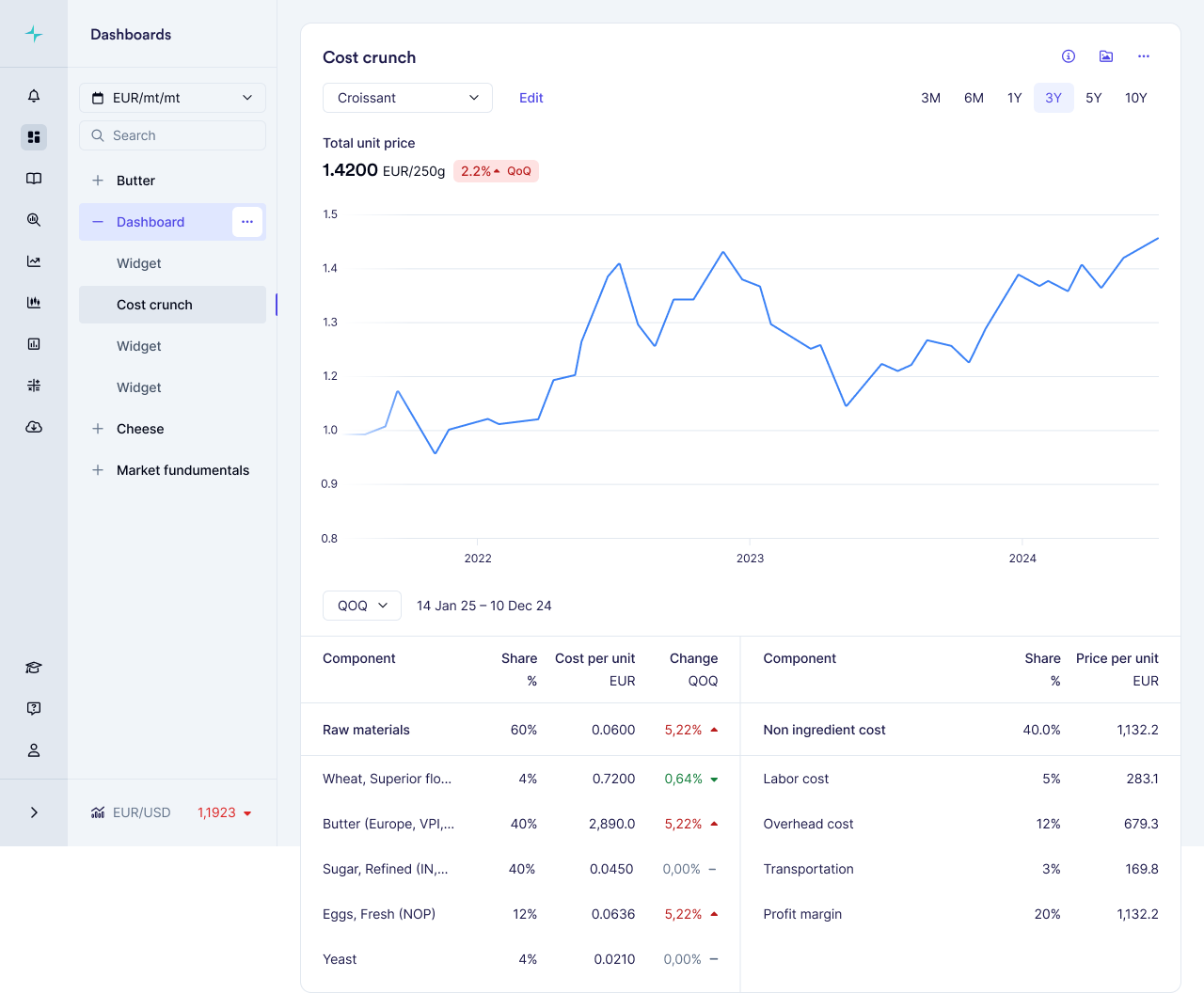
Summary: Vesper has launched Cost Models, a powerful new feature that transforms individual commodity benchmarks into complete product cost insights. This capability allows food manufacturers to combine weighted commodity benchmarks with standardized non-ingredient costs to build accurate product pricing models, delivering unprecedented visibility into true product economics.

What's New:

  • Build complete product cost models by combining multiple commodity benchmarks with precise weightings

  • Access industry-standard non-ingredient costs (labor, manufacturing, overhead) specific to your region

  • Choose from our template library for common food products or create custom models

  • Track how each component contributes to your total product cost with automatic updates whenever source prices change

Why It Matters: With record-high volatility across food commodities, understanding how ingredient changes impact finished products is critical for maintaining margins. Cost Models provide complete cost structure visibility for your entire organization: procurement teams can verify supplier price increases, finance can track margin impacts across product portfolios, and sales teams can justify price adjustments to customers with independently verified data. Non-ingredient costs can represent up to 47% of total product costs—a critical component that's now visible alongside your commodity benchmarks.

How to Use It:

  1. Access Cost Models through the main dashboard menu

  2. Choose between starting with a template or building a model from scratch

  3. Select ingredients from your available commodities and assign precise weightings

  4. Add country-specific non-ingredient costs by selecting your industry and location

  5. Save your model to track cost evolution over time as prices update automatically

Related Features: Cost Models integrates seamlessly with Vesper's existing capabilities:

  • Individual commodity price benchmarks (VPI, Partner prices, and Public benchmarks found in prices widgets)

  • Incorporate into your own custom dashboards

  • Coming in Q3 2025: Forecasting capabilities for your cost models

Did you like this update?

LikeNeutralDislike

Supply and Demand Map Improvements

by Vesper Team
Improvement
Data

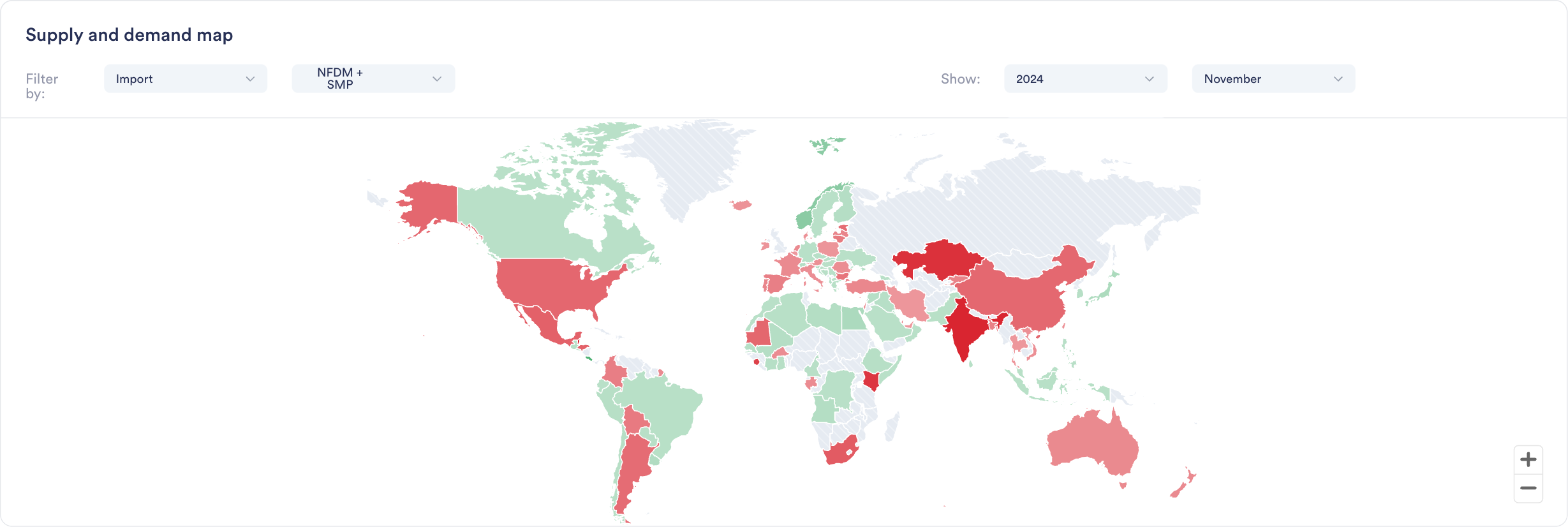
Enhanced S&D Map visualization now provides Year-to-Date (YTD) comparisons across regions, enabling instant visual insights into global production, import/export, and stock trends and regional shifts.

Why it Matters:"If I were interested to see where growth in EU milk production is happening, this would really quickly show me that it is not happening in Ireland, Netherlands or France. It's great for presentations, as not having to click through all countries at the same time makes it ideal for regions or groups of countries."

Jasper Endlich, Dairy Market Analyst

How to Use It:

  1. Find the World Map Widget in the S&D category

  2. Select your metric and timeframe of interest

  3. Compare countries and spot regional trends through color coding

  4. Export directly into presentations or add to your custom dashboards

Did you like this update?

LikeNeutralDislike